Artificial intelligence isn’t some wild sci-fi thing anymore. It’s out there, actually working in offices – automating IT support, handling HR tasks, and doing grunt work in finance. GenAI has moved way beyond chatbots. Now it’s more like a super-smart digital sidekick that can process requests, wrangle messy data, make decisions, and carry them out – all with barely any human intervention.
Thanks to modern low-code platforms like SimpleOne GenAI, pretty much anyone can build AI workflows now. Just drag-and-drop blocks in a visual editor. Forget needing to code. You get pre-built AI blocks, your company’s knowledge base hooked in, and even AI agents that can run on their own. So companies start automating faster, save some cash, and avoid those long, painful development cycles.
What is an AI workflow?
Picture workflows where AI isn’t just a helper – it’s baked right in. AI takes over tasks completely: answering questions, grabbing data from docs, shooting out notifications, kicking off new processes. It is not limited by rigid rules. Instead, it understands context, adapts on the fly, and works with “unstructured” data – texts, document scans, and audio – which rarely fits into clear templates.
Traditional automation vs. AI workflows
Take IT support. Old-school automation only works if someone types exactly, “The printer isn’t working.” But say, “Documents aren’t printing” or “The printer’s making weird noises”- the system just freezes up. AI workflows can handle all those variations. They classify, find solutions, send instructions, or assign tasks without tripping over different phrasings.
AI recruiter: reinventing HR automation
HR used to depend on either giant, pricey enterprise systems or tedious manual work in Excel. The big systems are slow to set up and pretty inflexible, and spreadsheets? They’re error magnets and impossible to scale. Low-code platforms flipped the script. HR teams now build hiring workflows in a couple of hours – no coding.
How SimpleOne does it
Step 1: Generating job descriptions
Previously, managers spent hours creating job descriptions. Now, all you need to do is enter a few details about the position, and AI will generate a high-quality, structured description. The recruiter reviews it, publishes it, and that’s it. What used to take a full day now takes just 15 minutes.
Step 2: Intelligent candidate screening
Previously, reviewing 150 resumes was a 12-hour marathon. Now, candidates upload their CVs, AI extracts all relevant information, matches it with the job requirements, and assigns a score to each candidate. Candidates with a score above 70% are selected. The remaining candidates are automatically rejected.
AI also provides a summary of key skills, so recruiters don’t have to deal with lengthy text. Instead, they see concise cards. The inspection time is reduced to 30 minutes, and the selection accuracy increases by about 40%.
Step 3: Interview preparation with AI
Interview preparation was always last minute. Managers just hoped they could come up with some questions before the meeting. Now, AI generates tailored questions for the top five candidates, focusing on unique experiences and gaps. Preparation goes from an hour to five minutes, and interviews are way sharper.
That’s just HR. SimpleOne lets any department grab AI blocks to build workflows around what they actually need -no clunky templates.
Building blocks of an AI workflow
To make AI workflows work smoothly in a big company, you need a few essentials:
Workflow builder: Visual AI process designer
Admins use a drag-and-drop editor to sketch out processes. AI becomes just another block – so you combine standard steps like conditions, loops, scripts, or AI blocks for classifying, generating text, spotting info in docs, and so on. No programming. Analysts can get smart workflows running in just a couple hours.
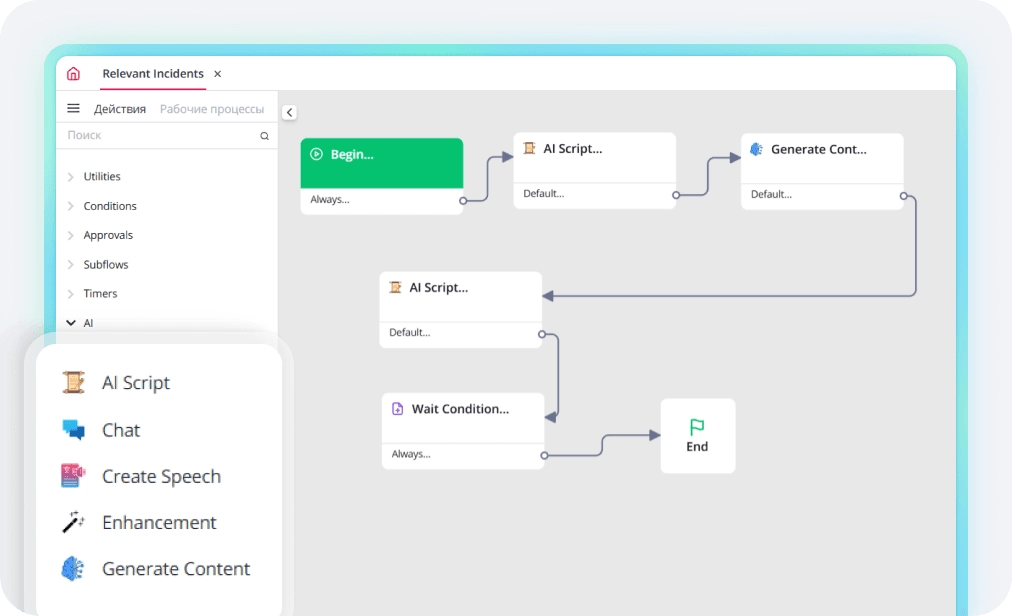
AI-Powered Business Process Automation in SimpleOne
AI Agents: Autonomous digital employees
AI agents don’t sit around waiting for instructions; they chase goals. Give them tools and a mission, and they figure out the rest. Say an agent gets, “Close all overdue tickets waiting on a customer.” It looks up the system, finds tickets untouched for three days, nudges the customer, closes cases if there’s no reply, and notifies the manager. If someone answers, the agent sets the ticket back to “In Progress.” They adapt, don’t stick to a script.
Corporate memory with RAG
One big headache: normal AI doesn’t know your company’s lingo or rules. Retrieval-Augmented Generation (RAG) fixes that. It connects AI to your internal data, so it answers with your policies, terminology, and history-making the AI part of your company’s brain.
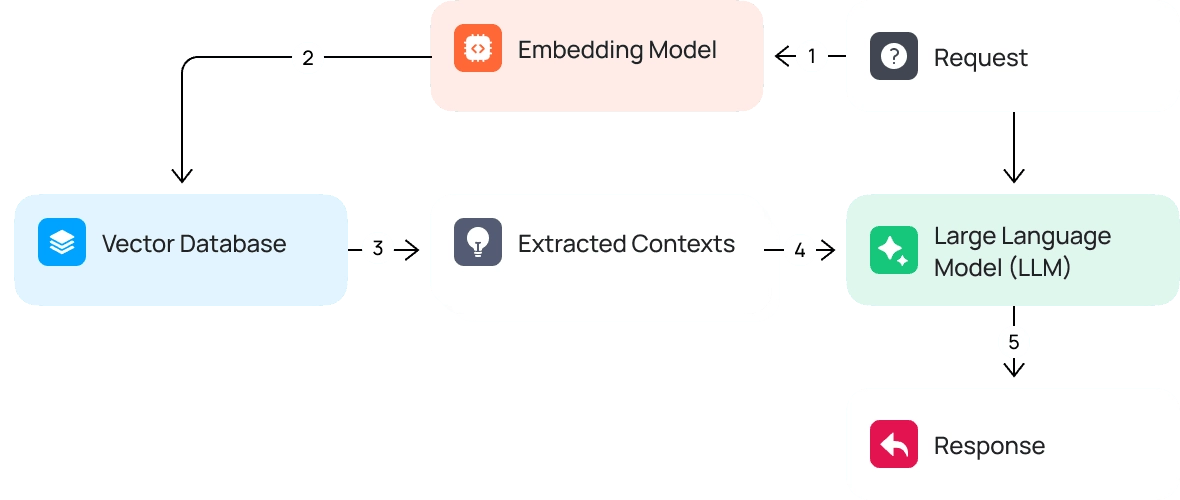
RAG Architecture on the SimpleOne GenAI Platform
Chatbot vs AI Assistant vs AI Agent
| Type | Autonomy level | Behavior |
| Chatbot | Very low | Question → Answer |
| AI Assistant | Low | supports human actions |
| AI Agent | High | plans and executes tasks independently |
Where AI workflows are already making a difference
IT Support
About 60-70% of Service Desk requests are routine tasks. AI agents automatically categorize requests, find answers in the knowledge base, perform simple actions like password resets, and transfer complex cases to a human.
As a result, approximately 40-50% of tickets are closed automatically, processing time is reduced to 30 minutes, and support staff can finally focus on more complex tasks.
Finance
Invoice processing is slow and dull. AI reads invoices with OCR, pulls out data, checks for errors, and creates payment entries. Missing info? It asks for clarification or sends the doc for review. Processing per invoice falls from 15 minutes to 2, errors drop by 80%, and teams save as much work as three full-time people.
Sales
A lot of sales reps waste about a third of their day updating CRMs. AI transcribes calls, picks out agreements, fills in the CRM, and sets up follow-ups. That’s five to seven hours saved a week, and with faster follow-ups, conversions get a boost.
Traditional Automation vs AI Workflows (GenAI-powered automation)
| Aspect | Traditional Automation | AI Workflows (GenAI + SimpleOne) |
| Logic | Fixed “if – then” rules | Context-aware AI decision-making |
| Flexibility | Rigid, predefined flows | Adaptive to real-world scenarios |
| Data handling | Structured data only | Structured + unstructured (text, PDFs, audio, scans) |
| Input understanding | Keyword-based matching | Understands meaning and intent |
| Exception handling | Breaks or needs manual fixes | Automatically adapts to edge cases |
| Setup speed | Long development cycles | Fast deployment via low-code (hours) |
| Human involvement | High for most tasks | Minimal, only for complex cases |
| IT support example | Requires exact phrase matching | Understands multiple variations of the same issue |
| HR & finance automation | Manual or template-based work | AI-driven classification, extraction, and processing |
The SimpleOne advantage: ready-made tools
SimpleOne GenAI makes adding AI painless. There’s a library of AI blocks- text generation, quality checks, auto-fill, transcription, chat, image and speech creation, custom logic – and a dashboard to manage it all. No coding. Workflows go live in hours.
Setup Options:
No-Code (visual editor)
Used by: business analysts, administrators, and support teams
Features: drag-and-drop process assembly, parameter and logic customization without code
Speed: launching a simple process in 1-2 hours
Low-Code (logic customization through UI)
Used by: system administrators and automation specialists
Features: complex conditions, routing, AI block customization, and error handling
Pro-Code (custom development)
Used by: developers and integrators
Features: JavaScript, REST API, complex AI Scripts, working with vector databases
Corporate Data & RAG Integration
To work well, AI needs company data. SimpleOne combines RAG and data vectorization. You upload knowledge bases, policies, ticket history, docs -they’re indexed as vectors. When someone asks a question, their query matches relevant docs, and AI delivers step-by-step answers.
Orchestration & Security
SimpleOne uses the Ainergy platform and AI Nexus, so you’re not stuck with one provider. It optimizes costs – simple jobs go to cheaper models – supports text, image, audio, flexible deployments, plus strong monitoring and access controls.
Security matters.Every action the AI takes is recorded – who started it, which module was used, what data went in and out, as well as all prompts and responses. That’s huge for finance, healthcare, or anywhere regulations matter.
Access is managed with RBAC. AI Admins have full reign, Support Agents work on preset processes, regular users just chat. Everyone gets only what they need.
Bottom line
AI workflows aren’t just hype – they’re already speeding up tasks, saving money, improving service, and making AI a real teammate. Thanks to low-code tools, ready-to-use blocks, and tight security, businesses can launch these solutions fast, without needing a giant IT team.
Get a consultation on AI Workflows with SimpleOne